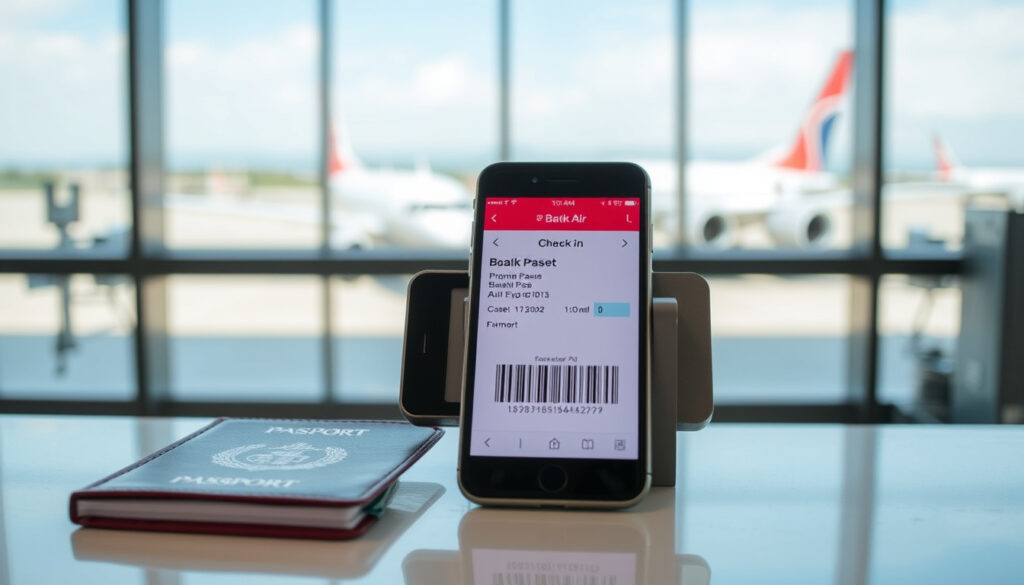
Batik Air Online Check-In: Timing, Steps & Mobile App Guide
Few things unsettle a traveler like an unfamiliar check-in process. Batik Air’s move to a mandatory mobile app for online check-in has left many passengers scrambling for answers. This guide walks through the timing, step-by-step procedures, and troubleshooting you need to breeze through Batik Air check-in—no surprises.
Online check-in window: 12 hours to 45 minutes before departure ·
Mobile app required: Yes (BookCabin) ·
Check-in fee: Free ·
Boarding pass delivery: Digital via app or email; print optional
Quick snapshot
- Opens 12 hours before departure (Google Play)
- Closes 45 minutes before departure (Tiket.com)
- Plan accordingly to avoid last-minute issues (Wild About Travel)
- BookCabin app mandatory (Wild About Travel)
- Download from App Store or Google Play (Apple App Store)
- Web check-in no longer available (Batik Air Help Center)
- Digital pass in app or email (Batik Air Help Center)
- Print at airport kiosk (Tiket.com)
- Some airports require printed copy (Wild About Travel)
- Visit airport counter or kiosk (Tiket.com)
- Arrive 2–3 hours early (Batik Air Help Center)
- Contact Batik Air customer service (Google Play)
Batik Air’s forced migration to the BookCabin app means that anyone without a smartphone or data plan must use an airport counter—potentially adding 30–60 minutes of wait time. The trade-off is a free digital boarding pass, but only if you’ve downloaded the app beforehand.
Six key facts at a glance:
| Fact | Value |
|---|---|
| Online check-in opens | 12 hours before departure (Google Play) |
| Online check-in closes | 45 minutes before departure (Tiket.com) |
| Required app | BookCabin (iOS and Android) (Apple App Store) |
| Cost | Free (Tiket.com) |
| Boarding pass format | Digital or print (Batik Air Help Center) |
| Seat selection | Available during check-in (subject to availability) |
The pattern: Batik Air has centralized all digital check-in into a single third‑party app, cutting out the old website option. This means the app is your only route to a digital pass—no more desktop check-in.
How early can you check-in at Batik Air?
When does online check-in open?
- Online check-in opens exactly 12 hours before the scheduled departure time for most domestic flights (Google Play).
- For Batik Air Malaysia flights, the window opens 24 hours before departure (Apple App Store).
When does online check-in close?
- It closes 45 minutes before departure (Tiket.com).
- Arriving at the airport with an unfinished check-in after that point means you must use the counter or kiosk.
The implication: timing is tight; missing the window adds airport wait.
How to check Batik Air ticket online?
Step-by-step via BookCabin app
- Download the BookCabin app from the Google Play Store or Apple App Store.
- Open the app and select “Check In.”
- Enter your booking reference (6‑letter PNR) and last name (Batik Air Help Center).
- Review your flight details and add any extras (baggage, seat selection).
- Confirm and receive your digital boarding pass in the app and via email (Wild About Travel).
The web check-in link on batikair.com now redirects to BookCabin, so the app is the only way to complete an online check‑in (Wild About Travel).
Batik Air Indonesia and Batik Air Malaysia booking codes are separate—an Indonesian PNR will not work for a Malaysia (OD) flight. Double-check which entity issued your ticket before entering the booking reference (Wild About Travel).
The takeaway: verifying your booking code saves time at the airport.
Is mobile check-in available with Batik Air?
Is the BookCabin app mandatory?
- Yes. As of November 2023, Batik Air discontinued web-based check-in and moved exclusively to the BookCabin app (Wild About Travel).
- The app is available in English, Bahasa Indonesian, and Thai (Apple App Store).
Can I check in via mobile browser?
- No. The mobile browser site redirects to the BookCabin app page (Tiket.com).
- You must have the app installed to proceed with online check-in.
The pattern: Batik Air has fully committed to app-only check-in.
How to print Batik Air boarding pass?
How to get a digital boarding pass
- After check-in, the digital boarding pass is available in the BookCabin app and sent to your email (Batik Air Help Center).
- You can open the PDF on your phone and show the barcode at the gate.
Printing at airport kiosk
- If you need a printed pass, use the self‑service kiosk at the airport (Tiket.com).
- Some airports, especially in smaller cities, may require a printed pass—check before you go.
The implication: carrying a smartphone with the app is the simplest route, but a printed backup can save you at airports with strict boarding pass policies.
What happens if I can’t check-in online?
Common reasons for check-in failure
- Incorrect booking reference or name mismatch (Batik Air Help Center)
- Using a booking code for the wrong Batik Air entity (ID vs OD) (Wild About Travel)
- Route restrictions: some international flights may not permit online check-in at all (Tiket.com)
- App or system errors—rare but reported
What to do at the airport
- Head to the Batik Air check-in counter or a self‑service kiosk.
- Arrive at least 2 hours before domestic flights and 3 hours before international flights to allow for queue time.
- Have your booking reference and identification ready.
A failed online check-in shifts your entire pre‑flight routine. For a 7 AM domestic flight, an extra hour at the counter means waking up at 4 AM instead of 5. Downloading the app and checking your PNR beforehand is the only way to keep that buffer small.
The lesson: preparation prevents disruption.
Confirmed facts
- Online check-in window is 12 hours to 45 minutes before departure (Tiket.com)
- Mobile check-in via BookCabin app is mandatory as of November 2023 (Wild About Travel)
- Digital boarding pass is sent via app or email (Batik Air Help Center)
What’s unclear
- Whether web check-in will be reinstated in the future
- Exact check-in rules for all international routes
- Whether airport kiosks are available at all airports served by Batik Air
What travelers are saying
“The BookCabin app worked fine for my Batik Air check-in. Just make sure you have the right booking code—Indonesia vs Malaysia.”
— Reddit user wanderingnotlost21
“Batik Air online check-in opens 12 hours before departure. Use the BookCabin app to get your boarding pass quickly.”
— Tiket.com guide (Tiket.com)
For travelers flying Batik Air, the choice is clear: download BookCabin before you head to the airport, verify your booking code matches the right airline entity, and you’ll save yourself the stress of a last‑minute counter scramble. Ignore the app, and you’re adding at least an hour to your pre‑flight wait—a penalty no one needs.
Related reading: ZIPAIR Singapore to Tokyo: Low-Cost Flights Guide & Review · Singapore Airlines Book the Cook – 2025 Pre-Order Guide
For travelers flying with other carriers, the Air Canada online check-in guide offers a similarly detailed breakdown of timing and mobile app options.
Frequently asked questions
Can I check in for my Batik Air flight without the BookCabin app?
No. As of November 2023, the only way to check in online is via the BookCabin app. Without it, you must use the airport counter or kiosk (Wild About Travel).
How do I download the BookCabin app?
Search for “BookCabin” on the Google Play Store or Apple App Store. The app is free.
Is there a fee for airport check-in?
No, airport counter check-in is free. However, some airports may charge for printed boarding passes at kiosks—check the airport’s policy.
Can I check in more than 12 hours in advance?
No. The system will not allow check-in before the window opens. For Batik Air Malaysia flights, the window is 24 hours (Google Play).
What if my flight is international and the check-in window differs?
Batik Air Indonesia international flights generally follow the 12-hour window, but some routes may have unique rules. Check the BookCabin app for your specific booking (Tiket.com).
How do I get my boarding pass if I didn’t receive it via email?
Open the BookCabin app and go to “My Bookings” to retrieve your digital pass. You can also print it at the airport kiosk using your booking reference.
Can I change my seat during online check-in?
Yes, seat selection is offered during the check-in process in the BookCabin app, subject to availability.
More related posts
 Fix ‘Your Organization’s Data Cannot Be Pasted Here’ Error
 COVID-19 Vaccine Ireland: Types, Boosters & HSE Guide 2025
 Emirates A380 Business Class – Seats, Features and Reviews
 Skechers Friendship Walk 2025: Dates, Registration & Guide
 Sembawang Traditional Claypot Rice: Unique & Where to Find
 The Fantastic Four: First Steps Cast Guide
 Post Renovation Cleaning Singapore: Cost & Top Services